
















Symplify launches redesigned App Push editor for smoother CRM workflows
Symplify has launched a redesigned version of its App Push editor, giving operators and CRM teams a more streamlined environment for creating and managing mobile notification campaigns. The update focuses on simplifying campaign workflows while bringing App Push functionality into closer alignment with the wider Symplify platform.
Headquartered in Stockholm, Sweden, Symplify provides cloud-based solutions covering CRM, marketing automation and conversion optimisation. Its communication platform includes App Push alongside channels such as email, SMS, web push and other customer engagement tools.
The redesigned editor represents a refinement of that broader approach. Rather than introducing a fundamentally different campaign model, the update focuses on improving how users interact with existing App Push functionality. The result is intended to make campaign creation more intuitive while reducing unnecessary movement between different parts of the platform.









For businesses relying on mobile communication as part of their customer lifecycle strategy, that type of workflow improvement can be particularly relevant. App Push notifications can be used for timely communications, reminders, updates and engagement messages where reaching users directly on their devices is an important part of the customer journey.
Campaign creation moves into the settings panel
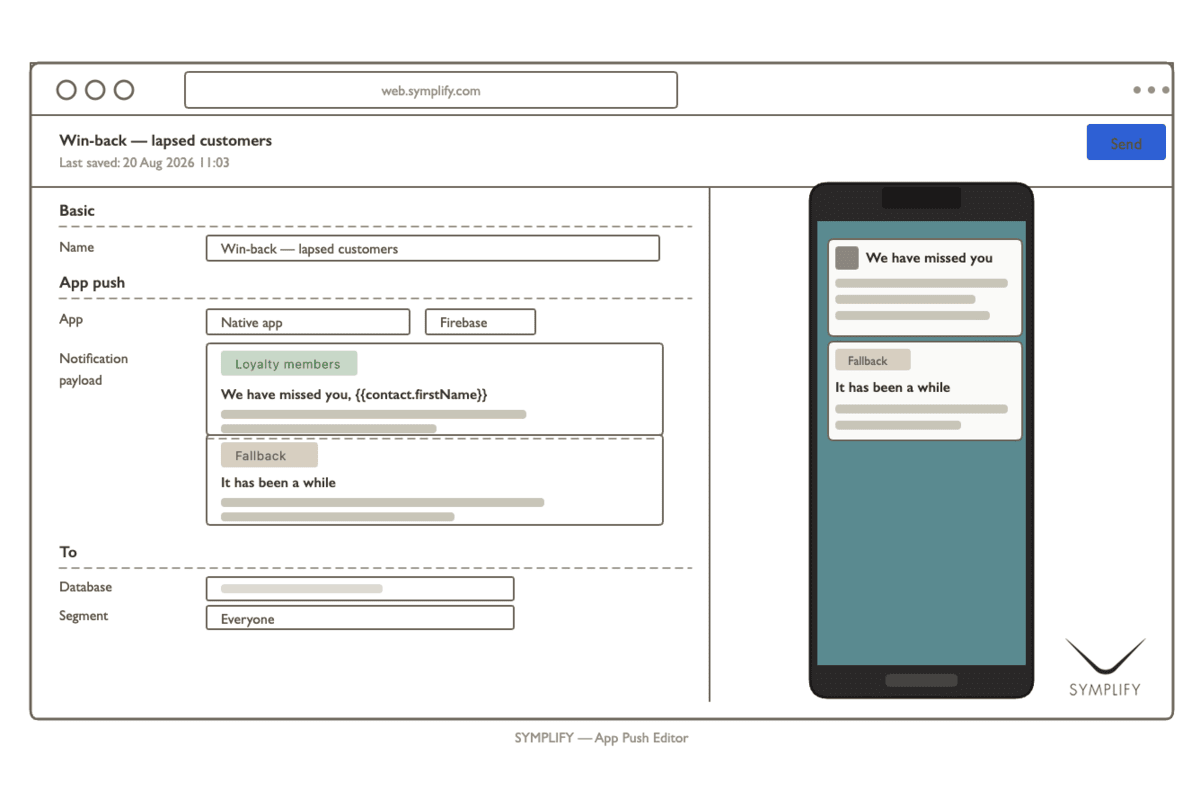
One of the main changes introduced by Symplify is the relocation of content creation into the settings panel. Under the redesigned workflow, users can add campaign content directly within the same area where they configure other settings instead of working through a separate section.
This structure is designed to make the creation process easier to follow. Keeping core campaign inputs together can help CRM teams move from configuration to content creation without repeatedly switching between different interface areas.
The change may also be useful for teams that manage a large volume of campaigns. In a busy CRM environment, even relatively small interface improvements can affect how quickly marketers can prepare, review and publish communications.
Symplify already positions its App Push solution as an integrated part of its marketing automation environment. Its platform documentation explains that App Push can be used through campaigns and journeys with settings covering the relevant application, platform, audience and message content.
Preview functionality supports easier campaign review
The new editor also introduces a preview function that allows users to see how a notification is expected to appear while they are building the campaign.
Preview capabilities are particularly important for mobile communications because the presentation of a message can influence whether recipients immediately understand its purpose. Formatting, wording and overall structure need to work within the constraints of a notification interface.
By bringing the preview into the campaign creation process, Symplify is placing more emphasis on reviewing the message before finalising it. This gives CRM teams an opportunity to assess the notification as they build it rather than relying solely on the configuration fields.
Symplify's existing App Push offering is designed to provide marketers with control over mobile messaging while supporting integrations with different application environments. The company's own platform materials describe App Push as part of its wider marketing automation suite.
New options for audience segmentation
Another key element of the redesign relates to audience segmentation. Symplify has adjusted the editor to make it easier for CRM teams to create multiple notifications aimed at different audience groups.
Under the updated structure, the first notification acts as a fallback for recipients who do not meet the conditions of a defined segment. This provides a practical framework for combining targeted communications with broader campaign coverage.
For example, a CRM team could create a specific notification for one defined segment and then use the fallback notification for everyone else who remains eligible to receive the campaign. This approach can help marketers build a more structured messaging hierarchy without creating unnecessary complexity in the campaign setup.
Audience segmentation is an important part of modern CRM strategies because customers do not necessarily respond to identical messages in the same way. The ability to tailor communication according to audience characteristics can support more relevant customer journeys while helping teams organise campaigns more efficiently.
Symplify has long incorporated segmentation and customer journey tools into its wider platform. The company describes its communication suite as supporting customer lifecycle management through segmentation and journey-based marketing automation.
A clearer settings structure for CRM teams
Alongside the segmentation changes, Symplify has updated the settings section with clearer navigation and a more user-friendly structure.
The emphasis on navigation reflects a broader trend across enterprise marketing software, where usability increasingly forms part of the product experience. CRM professionals may work with numerous campaigns, segments and communication channels at the same time, making clear configuration steps important for reducing avoidable errors and improving operational consistency.
For teams managing App Push alongside email, SMS or web push campaigns, consistency across the interface can also make the wider platform easier to understand. Symplify has previously highlighted its goal of connecting multiple communication channels through a unified environment.
The company's platform currently presents App Push as one component of a broader communication ecosystem. This allows mobile messaging to sit within larger customer engagement strategies rather than being treated exclusively as an isolated notification tool.
App Push campaigns can now be deleted through the interface
The redesigned editor also adds the ability to delete App Push campaigns directly through the user interface.
This provides greater control over campaign administration and removes the need for users to rely on alternative procedures when a campaign is no longer required. The change is particularly relevant to teams that regularly test campaign concepts, revise communication plans or maintain large campaign libraries.
Direct campaign management can also contribute to a cleaner workspace over time. Removing obsolete material may make it easier for users to identify active or relevant campaigns when returning to the platform.
The addition is therefore less about changing the communication function itself and more about giving CRM users greater control over the administrative side of campaign management.
Christoffer Feldt-Sørensen highlights usability
Symplify Chief Sales Officer Christoffer Feldt-Sørensen said:
“Our new App Push editor is designed to deliver a faster, more intuitive user experience. The redesign focus has been on usability and workflow efficiency, making campaign creation easier while giving teams greater flexibility and control directly within the platform.”
The comments place the emphasis of the update on usability rather than on a change to Symplify's overall App Push strategy. The redesign is positioned as an effort to make existing functionality easier to work with while supporting more efficient campaign creation.
Feldt-Sørensen is identified by Symplify as its Chief Sales Officer in the company's recent corporate and industry materials. His role has included discussing CRM, automation, customer engagement and the development of marketing technology for operators.
Why the update matters for mobile CRM
Mobile push communication remains an important channel for organisations seeking direct customer engagement. Unlike channels that depend on users actively opening an inbox or visiting a website, push notifications can place a message directly within the operating environment of a user's mobile device, subject to the relevant permissions and technical implementation.
Apple's developer documentation notes that remote notifications can deliver information to users even when an application is not running, with delivery handled through Apple Push Notification service. The same technical framework also allows applications to include custom data within notification payloads.
For CRM teams, however, the technology behind notification delivery is only one part of the process. The practical challenge is often creating the right message, choosing the right audience and managing campaign logic efficiently. That is where interface improvements such as those introduced by Symplify can have operational value.
The redesigned App Push editor therefore fits into a broader movement toward making CRM platforms easier for marketing teams to operate without unnecessary technical friction.
A more integrated approach to campaign management
Symplify's latest App Push update also reinforces the company's wider positioning around integrated customer communication.
The platform supports multiple communication channels and allows users to connect messaging activities with broader campaign and journey functionality. Its App Push materials highlight the channel's role within the company's marketing automation suite rather than treating push messaging as a standalone product.
For operators and other organisations that depend on structured customer engagement, the ability to manage audience logic, campaign content and notification presentation within a consistent workflow can make day-to-day execution more straightforward.
The redesigned editor appears focused on precisely that area. The changes do not simply add another notification format. Instead, they refine how teams build, review, segment and administer campaigns from within the Symplify environment.
Conclusion
Symplify's redesigned App Push editor marks a practical enhancement to the company's mobile communication offering, with the changes centred on usability, campaign structure and workflow efficiency. Moving content creation into the settings panel, adding in-editor previews, improving audience segmentation and enabling direct campaign deletion all give CRM teams more control over routine campaign management.
The update also strengthens the role of App Push within Symplify's broader communication and marketing automation ecosystem. As customer engagement becomes increasingly dependent on timely and relevant messaging, the ability to create targeted campaigns through a clear interface can be an important operational advantage.
For operators and CRM professionals, the significance of the redesign is therefore less about a single new feature and more about how several smaller improvements work together. By bringing campaign creation, audience logic, review and management into a more cohesive workflow, Symplify is seeking to make mobile engagement easier to manage while maintaining the flexibility required by modern CRM teams.
FAQs
What has Symplify changed in its App Push editor?
Symplify has redesigned its App Push editor to provide a more consistent interface, simplify campaign creation and improve campaign management.
Where is App Push content added in the redesigned editor?
Content can now be added directly within the settings panel rather than being handled through a separate section.
Does the new Symplify editor include a preview feature?
Yes. The redesigned editor includes a preview function that allows users to review how a notification will appear while creating a campaign.
How has Symplify changed audience segmentation?
The updated workflow allows CRM teams to create notifications for different audience segments while using the first notification as a fallback for recipients who do not match a defined segment.
What is the fallback notification used for?
The fallback notification is intended for recipients who do not qualify for one of the defined audience segments in the campaign setup.
Can App Push campaigns now be deleted from the interface?
Yes. Symplify has added functionality that allows users to delete App Push campaigns directly through the user interface.
Who is Christoffer Feldt-Sørensen?
Christoffer Feldt-Sørensen is Symplify's Chief Sales Officer and has represented the company in discussions covering CRM, marketing automation and customer engagement.
What is Symplify's App Push service used for?
Symplify's App Push service is designed to help businesses send notifications to users of their mobile applications as part of customer communication and marketing activities.
Is App Push part of the wider Symplify platform?
Yes. Symplify presents App Push as one component of its wider communication and marketing automation platform alongside other communication channels.
Why is the redesigned editor relevant to CRM teams?
The redesign can help CRM teams manage campaign creation, message review, audience segmentation and campaign administration through a more unified workflow.

Claire
A highly motivated, results-driven, enthusiastic and ambitious writer. I can offer you well researched and high-quality article writing on any topic for your website or blog and can as well re-write your existing web content.
Related Posts


Scalara Labs launches casino platform with AI and no-code operator control
September 30, 2026

ThrillTech launches ThrillArena as a player-funded tournament platform
September 28, 2026

Symplify partners with Promofy to integrate gamification into CRM journeys
September 28, 2026
DeGaming unveils new identity built around transparent iGaming systems
September 25, 2026
Fast Track launches native Fast Track AI app for iPhone business users
September 25, 2026

EveryMatrix powers Danske Licens Spil casino platform launch in Denmark
September 25, 2026